Generative AI can turn a written instruction into an article, image, character, voice, or video.
The result may appear in seconds, but the process behind it involves several stages: training a model on large collections of examples, translating a user's input into machine-readable information, generating a possible output, and refining that output through human feedback and editing.
The simplest way to understand AI-generated content is this: a generative model learns patterns from training data and uses those patterns to produce a new result that fits the conditions it receives.
That does not mean the system thinks like a person, understands creative intent in the human sense, or guarantees a correct result. It predicts and constructs outputs from learned relationships. The creator still supplies the goal, evaluates what was produced, and decides what deserves to be kept.
This guide explains how generative AI works in accessible terms, from training and prompts to image diffusion, video motion, editing, limitations, and responsible use.
AI Image Generator landing page
What Is AI-Generated Content?
AI-generated content is text, imagery, audio, video, or other media produced partly or substantially by a generative model. A person may begin the process with a prompt, reference image, selected Style, or other controls. The system then creates an output based on those inputs and what it learned during training.
Common forms include:
The phrase “AI-generated” can make the process sound fully automatic. In practice, useful work involves human decisions: writing the brief, testing variations, rejecting weak outputs, editing details, and arranging the result.
How Generative AI Learns
Before a generative model can respond to a prompt, it must be trained. Training exposes the model to many examples and adjusts its internal parameters so it becomes better at recognizing and predicting patterns.
A language model may learn relationships among words, phrases, structures, and ideas by predicting tokens, which are small units of text. Many modern language systems build on the Transformer architecture, which uses attention mechanisms to model relationships among parts of a sequence. The original Transformer research showed how attention could replace recurrent processing for sequence tasks and make training more parallelizable.
An image model may learn visual relationships among shapes, colors, textures, compositions, and text descriptions. Vision-language training can connect written concepts with visual features. For example, CLIP demonstrated a method for learning from paired images and captions so natural language could refer to learned visual concepts.
Training changes the model's numerical parameters; it does not normally create a simple folder that the model searches whenever someone writes a prompt. The trained system represents learned relationships across many examples. However, models can sometimes reproduce elements too closely, particularly when data is duplicated or distinctive, so creators should not assume every generated result is automatically original or safe to use.
Training is different from generation
Two stages are often confused:
The user does not retrain the entire model each time they revise a prompt. They change the conditions applied during generation.
How a Prompt Becomes an Output
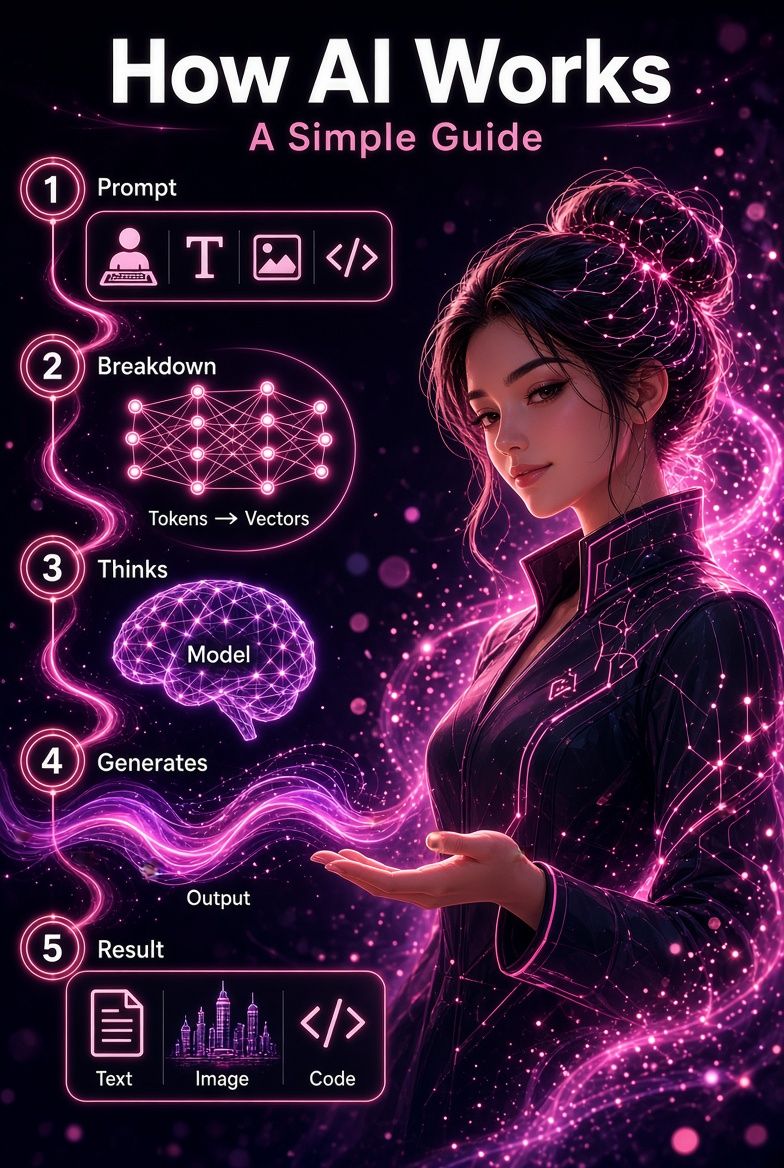
The details vary by model, but a typical AI content-generation workflow follows five broad stages.
1. The creator provides a condition
The condition may be a written prompt, image, mask, character reference, audio clip, or combination of inputs. Settings such as Style, aspect ratio, prompt strength, motion, or duration may add further constraints when a tool supports them.
A prompt is not code that specifies every pixel or word. It is a creative direction. Clear instructions usually give the model a stronger signal, but the output remains a generated interpretation.
2. The system encodes the input
The model converts the input into numerical representations, often called embeddings. These representations capture relationships that the system can process mathematically.
For text-to-image generation, the model connects words such as “close-up portrait,” “warm window light,” and “shallow depth of field” with learned visual features. It does not need a human-readable definition of every phrase. It works with learned positions and relationships in a high-dimensional representation space.
3. The model samples a possible result
Generative models are probabilistic. Instead of retrieving one fixed answer, they calculate a plausible continuation or output. That is why the same prompt may produce different results across several generations.
Randomness is useful because it creates variation. It also means a detailed prompt cannot guarantee perfect control. The model may emphasize one instruction, weaken another, or combine concepts in an unexpected way.
4. The output is decoded into usable media
The model's internal representation must be converted into words, pixels, audio samples, or video frames. Depending on the system, additional processing may improve resolution, smooth motion, generate audio, or apply safety checks.
5. The creator reviews and refines
The first output is best treated as a draft. The creator can revise the prompt, simplify conflicting instructions, adjust settings, choose a stronger reference, edit a local area, or select a different result.
This feedback loop is where generative AI becomes a practical creative tool:
Define → Generate → Evaluate → Revise → Select → Edit
How AI-Generated Images Work
Many modern image generators use diffusion-based methods. During training, a diffusion model learns how to reverse a process that gradually adds noise to images. During generation, the system begins with noise or a noisy internal representation and repeatedly denoises it toward an image that fits the prompt.
The foundational diffusion research described a class of generative models capable of high-quality image synthesis. Later latent-diffusion research made the process more efficient by performing much of the work in a compressed representation rather than directly across every full-resolution pixel. It also used cross-attention to condition generation on inputs such as text.
In simplified terms:
This explains why prompt wording matters but does not act like an exact blueprint. Each denoising step is influenced by learned probabilities and the model's available controls.
Text-to-image, image-to-image, and inpainting
Not every image workflow starts from pure noise.
These methods share a generative foundation, but they give the creator different levels and types of control.
How AI-Generated Video Works

Video generation adds time to the problem. A good result must not only create convincing individual frames; it must also preserve subjects, lighting, objects, and motion from one moment to the next.
Video diffusion research extends generative modeling across spatial and temporal information. Early work demonstrated text-conditioned video generation and methods for extending samples in space and time.
There are two common starting points:
For image-to-video creation, the source image answers much of the “what does the scene look like?” question. The prompt should usually concentrate on “what happens next?”—such as facial movement, body movement, environmental effects, camera motion, pacing, and audio when supported.
Video remains more demanding than a single image because small inconsistencies can become obvious across frames. Overloaded motion instructions, large camera moves, and multiple simultaneous actions may increase the chance of warping, flicker, or identity drift.
Why AI Outputs Vary
Two generations from the same prompt may look different because generative systems sample from a range of possible outputs. Variation can also come from the model, seed, selected Style, settings, reference image, safety filters, and updates to the service.
The model also has to balance every instruction. Several subjects, actions, camera directions, and conflicting styles create competing demands.
Better control usually comes from:
Iteration is not evidence that the tool failed. It is part of probabilistic creation. The practical goal is not to eliminate variation, but to direct and curate it.
What Generative AI Can and Cannot Do
Generative AI is useful for brainstorming, prototyping, variation, personalization, editing, and producing first drafts. It can lower the effort required to visualize an idea and make experimentation more accessible.
However, it does not guarantee:
The creator must therefore evaluate more than appearance. A polished output can still be inaccurate, inappropriate, derivative, or unsuitable for its intended context.
The Human Role in AI Content Creation
AI changes creative production, but it does not remove creative responsibility. People still make the decisions that shape a project:
This distinction matters for quality and authorship. In the United States, the Copyright Office has stated that copyrightability depends on sufficient human authorship and is assessed case by case; merely providing prompts does not automatically make all generated material protectable.
The strongest workflow treats AI as a system for proposing possibilities. Human judgment gives those possibilities direction, coherence, and meaning.
A Responsible AI Creation Checklist
Before publishing or sharing AI-generated content, ask:
Provenance systems can support transparency. The C2PA specification provides a framework for attaching verifiable information about the origin and editing history of digital media. Provenance does not prove that a claim is true, but it can help people understand how an asset was created or modified.
Frequently Asked Questions
How does AI-generated content work?
A trained generative model converts a prompt or reference into numerical representations, samples a result based on learned patterns, and decodes that result into text, imagery, audio, or video. The user then reviews and refines the output.
Does generative AI copy content from its training data?
It generally generates from learned statistical relationships rather than searching a simple content library. However, memorization and close reproduction can occur, so generated output should not automatically be assumed original or free of rights concerns.
Why does the same AI prompt produce different results?
Generative systems use probabilistic sampling. Randomness, seeds, settings, model choice, references, and service updates can all change the result.
How do AI image generators understand prompts?
They encode text into numerical representations and use learned relationships between language and visual features to guide generation. They do not understand a prompt exactly as a human artist would.
What is diffusion in AI image generation?
Diffusion is a generative method that learns to reverse a noise-adding process. During generation, the model gradually removes noise while conditioning the emerging image on a prompt or other input.
How does image-to-video AI work?
The source image establishes the initial appearance and composition. The model generates a sequence of frames conditioned by that image and a prompt describing movement, camera behavior, or scene changes.
Can AI-generated content be inaccurate?
Yes. Text systems can produce false statements, and visual systems can create anatomical, spatial, continuity, or contextual errors. Important outputs require human review.
Is AI-generated content copyrighted?
The answer depends on the jurisdiction and the nature of the human contribution. In the United States, copyright protection requires sufficient human authorship and is evaluated case by case.
Does a longer prompt always create a better result?
No. Useful detail can improve direction, but excessive or conflicting instructions can weaken the output. A focused prompt with a clear subject, action, setting, composition, and mood is often easier to control.
Turn an Idea Into a Creative Workflow
AI-generated content begins with learned patterns, but useful creation does not end with a model's first response. The creator defines the idea, supplies the conditions, evaluates alternatives, corrects problems, and decides how the result should be used.
Understanding that workflow makes generative AI less mysterious and more practical. A prompt is direction, not a guarantee. A generated image is a draft, not proof of accuracy or originality. A polished result still needs human judgment.
Start with a clear idea. Generate a focused first version. Review what the model interpreted correctly. Change one important variable, test again, and keep only the outputs that support your creative goal.
Create an AI-generated image with the AI Image Generator