AI Character Prompts: Examples, Templates & Tips
Discover the best AI character prompts with ready-to-use examples, prompt templates, and tips for creating detailed and consistent fictional AI characters.
On this page
Creating a memorable AI character starts with a good prompt.
A basic description can generate a character, but adding the right details gives the AI more direction over appearance, clothing, style, pose, personality, and setting.
Whether you are creating a new fictional character or trying to maintain the same character across multiple images, learning how to structure your prompts can help you get more controlled results.
In this guide, we will cover:
- How to write AI character prompts
- A simple character prompt formula
- Ready-to-use AI character prompt examples
- Character prompt templates
- How prompts and tags work together
- How to improve character consistency
- Common prompt mistakes
If you are testing unfamiliar or highly specific prompts, also read our Prompt Testing Guide: How to Avoid Wasting Gems on Unsupported Prompts.
It explains how to test whether a concept is supported before spending more Gems on repeated generations.
What Is an AI Character Prompt?
An AI character prompt is a written description that tells an AI image generator what kind of character you want to create.
The prompt can describe details such as:
- Appearance
- Hair
- Face
- Body characteristics
- Clothing
- Pose
- Expression
- Personality
- Environment
- Lighting
- Art style
- Camera composition
For example, instead of writing:
“Beautiful fantasy woman.”
You could write:
“1girl, solo, elf, long silver hair, emerald green eyes, elegant facial features, dark green dress, confident expression, standing, ancient forest, soft moonlight, confident expression, detailed fantasy illustration”
For Example:
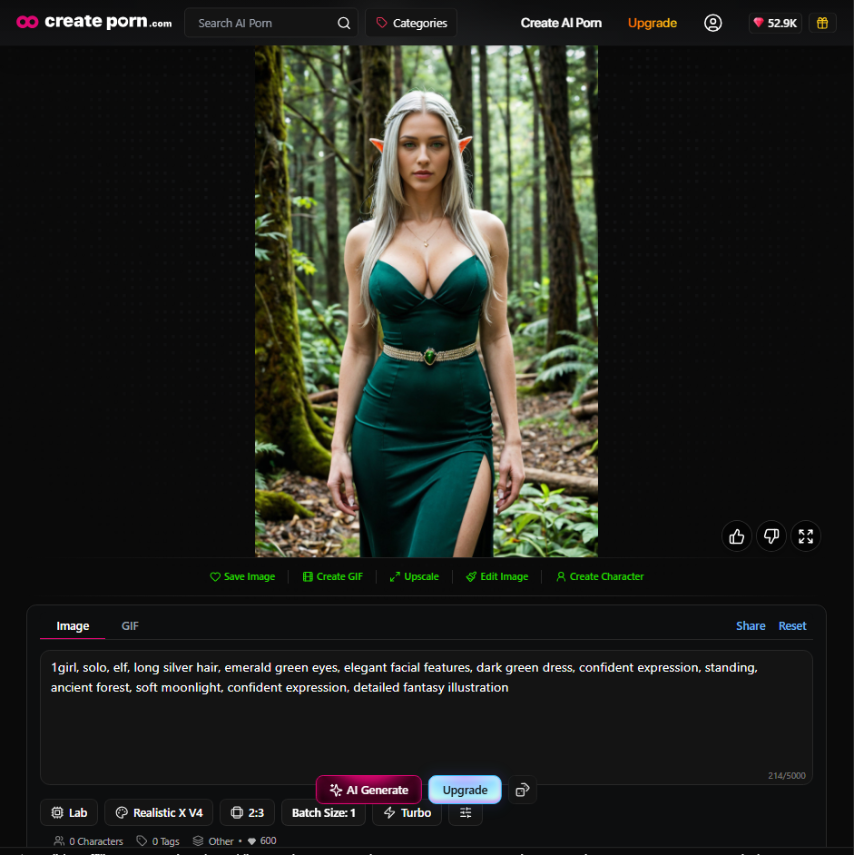
The second prompt gives the AI much more information about the intended character and visual direction.
AI Character Prompt Formula
A simple way to build character prompts is to divide the description into several parts.
Use this formula:
[Character] + [Appearance] + [Clothing] + [Pose or Action] + [Expression] + [Environment] + [Lighting] + [Art Style]
You do not always need every element.
However, including the most important details can give the AI clearer instructions.
Character
Start by defining who the character is.
Examples:
- Fictional adult woman
- Fictional adult man
- Fantasy elf
- Cyberpunk character
- Anime heroine
- Vampire
- Warrior
- Mage
- Sci-fi explorer
Appearance
Describe recognizable physical characteristics.
You might include:
- Hair color
- Hair style
- Eye color
- Facial features
- Skin tone
- Build
- Makeup
- Distinguishing features
Example:
“Long black wavy hair, green eyes, warm skin tone, sharp facial features.”
Clothing
Clothing helps establish the character's identity and setting.
Examples:
- Black evening dress
- Fantasy armor
- Oversized hoodie
- Cyberpunk jacket
- Mage robes
- Medieval clothing
- Futuristic bodysuit
Pose and Action
Tell the AI what the character is doing.
Examples:
- Standing confidently
- Sitting beside a window
- Walking through a city
- Looking over her shoulder
- Holding a sword
- Reading a book
- Leaning against a wall
Expression
Expressions can dramatically change the feeling of a character.
Examples:
- Confident expression
- Playful smile
- Serious expression
- Relaxed expression
- Mysterious look
- Surprised expression
Environment
Add context around the character.
Examples:
- Neon cyberpunk city
- Luxury apartment
- Medieval castle
- Fantasy forest
- Beach at sunset
- Futuristic spaceship
- Cozy bedroom
- Busy city street
Lighting
Lighting helps control the atmosphere.
Examples:
- Soft natural lighting
- Golden-hour lighting
- Neon lighting
- Cinematic lighting
- Warm indoor lighting
- Dramatic rim lighting
- Moonlight
Art Style
Finally, describe how you want the image to look.
Examples:
- Anime illustration
- 2.5D illustration
- Fantasy artwork
- Cinematic digital art
- Comic illustration
- Stylized character art
Best AI Character Prompt Examples
The following prompts can be used as starting points and customized for your own characters.
Fantasy Character Prompt
https://www.createporn.com/post/6a82feb13a5336a7ff3aa356
“Fictional adult elven woman, long silver hair, emerald green eyes, elegant facial features, fitted dark green fantasy clothing, standing inside an ancient enchanted forest, confident expression, glowing plants in the background, soft moonlight, detailed fantasy illustration.”
Cyberpunk Character Prompt
https://www.createporn.com/post/6a82ff223a5336a7ff3bb323
“Fictional adult cyberpunk woman, shoulder-length black hair with blue highlights, sharp facial features, futuristic black jacket, neon accessories, standing on a rainy city street, glowing signs in the background, confident pose, cinematic neon lighting, detailed cyberpunk artwork.”
Anime Character Prompt
For anime generations, users generally do not need to include “anime” in the prompt. Instead, select an Anime style and use the prompt to describe the character, setting, pose, clothing, lighting, and other details you want to see.
Medieval Character Prompt
https://www.createporn.com/post/6a82ff7d3a5336a7ff3c8d3a
“Fictional adult medieval woman, long auburn hair, green eyes, elegant facial features, detailed medieval dress, standing inside a stone castle courtyard, calm expression, soft morning light, cinematic medieval fantasy artwork.”
Vampire Character Prompt
https://www.createporn.com/post/6a82ffde3a5336a7ff3d6c06
“Fictional adult vampire woman, long black hair, pale complexion, deep red eyes, elegant gothic clothing, standing inside a candlelit mansion, mysterious expression, dark atmospheric lighting, detailed gothic fantasy illustration.”
Sci-Fi Character Prompt
https://www.createporn.com/post/6a8300053a5336a7ff3dd388
“Fictional adult futuristic explorer, silver-white hair, blue eyes, sleek futuristic clothing, standing inside a spacecraft observation deck, distant planet visible through the window, determined expression, cool cinematic lighting, detailed science-fiction artwork.”
Casual Character Prompt
https://www.createporn.com/post/6a8300393a5336a7ff3e455b
“Fictional adult woman, shoulder-length brown hair, brown eyes, natural facial features, casual fitted shirt and jeans, sitting inside a modern apartment, relaxed expression, soft window lighting, detailed character illustration.”
AI Character Design Prompt Template
If you want to create your own prompt quickly, use this template:
“Fictional adult [character type], [hair description], [eye color], [facial features], [other recognizable traits], wearing [clothing], [pose or action], [expression], in [environment], [lighting], [art style]”
For example:
“Fictional adult fantasy mage, long white braided hair, violet eyes, elegant facial features, wearing dark blue mage robes, holding a glowing spellbook, focused expression, inside an ancient library, warm candlelight, detailed fantasy artwork, ”
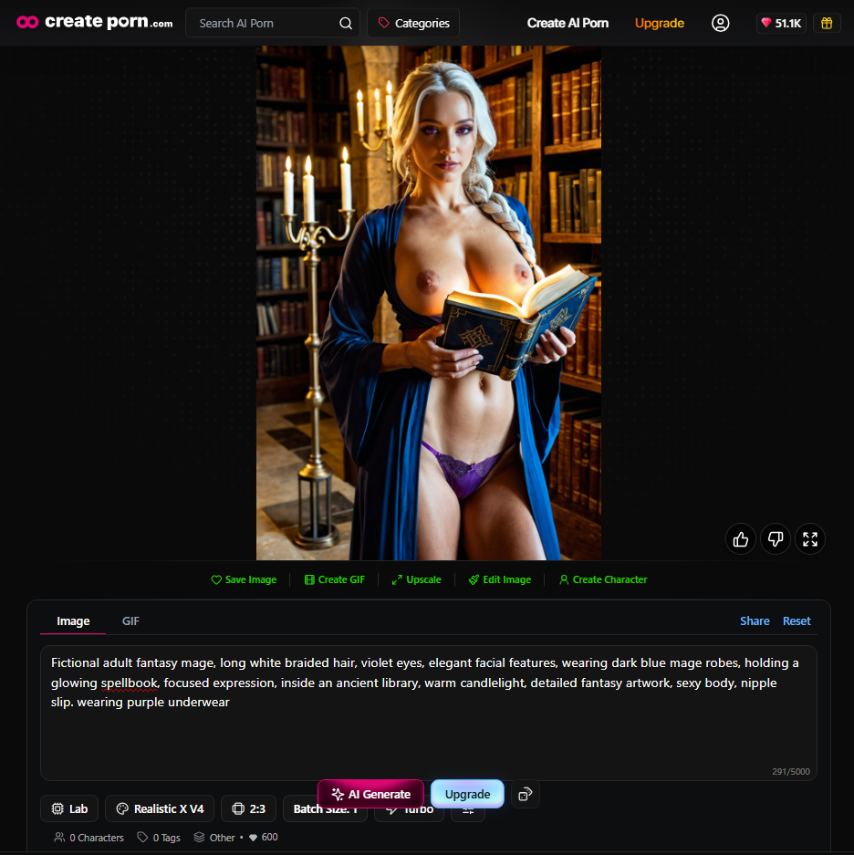
You can save character templates like this and change individual elements without rebuilding the entire prompt.
Creating More Detailed AI Character Prompts
More words do not automatically make a better prompt.
The goal is to provide useful information.
Focus first on the details that matter most to the character.
For example:
Weak prompt:
“Beautiful woman in a city.”
Improved prompt:
“Fictional adult woman, shoulder-length black hair, brown eyes, elegant facial features, black evening dress, standing on a rooftop overlooking a modern city, confident expression, nighttime skyline, cinematic lighting,”
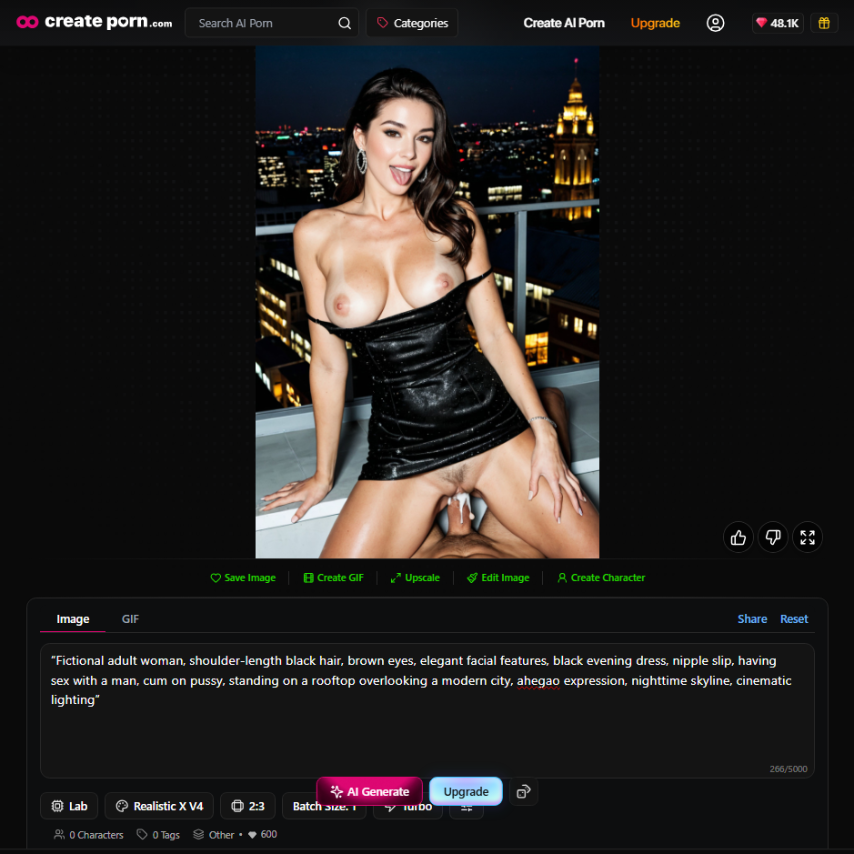
The improved version gives the AI clearer information about the subject, appearance, clothing, environment, expression, and lighting.
Using Tags With Character Prompts
Prompts describe your overall idea, while tags can provide additional structured controls.
Depending on the creation workflow, tags can help define elements such as:
- Character attributes
- Actions
- Camera angle
- Lighting
- Location
- Number of characters
- Time of day
- Viewing distance
- Weather
- Visual style
For example, your written prompt might describe the character's appearance while tags control the camera angle, lighting, pose, or environment.
This can make complex prompts easier to manage.
→ AI Prompt Guide
How to Create Consistent AI Characters
One of the biggest challenges in AI character creation is keeping the same character recognizable across multiple generations.
Generating a completely new description every time can introduce changes to the character's appearance.
Instead, identify the character's most important visual traits and reuse them.
For example:
Character Base
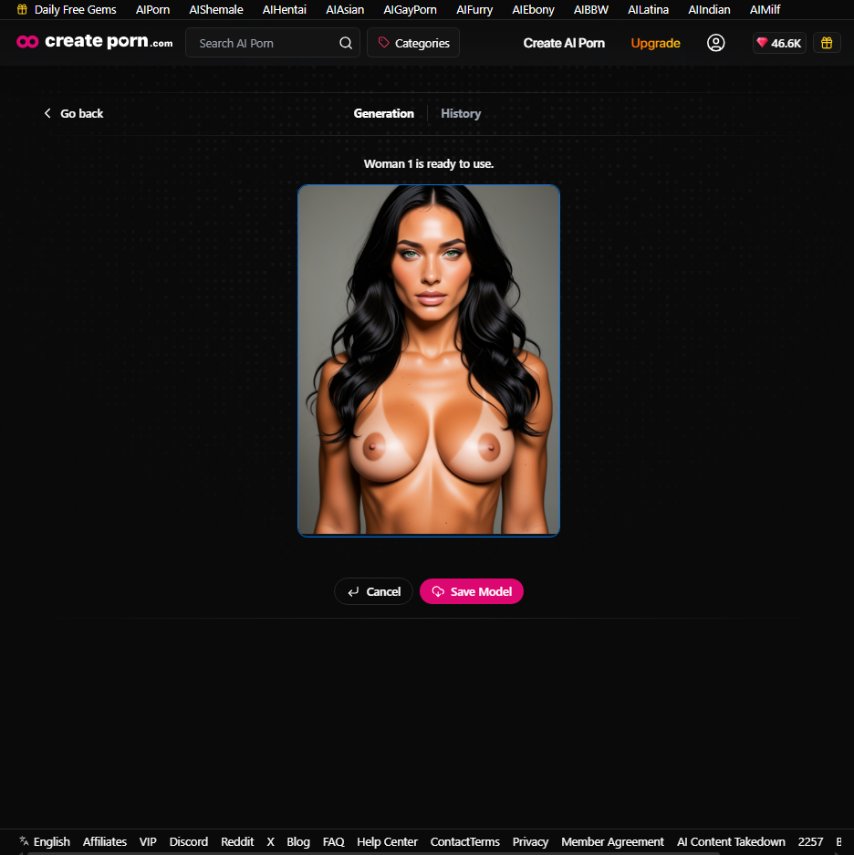
“Fictional adult woman, long wavy black hair, bright green eyes, warm skin tone, defined facial features, “
Keep this base description whenever you create the character.
Then change the scene information separately.
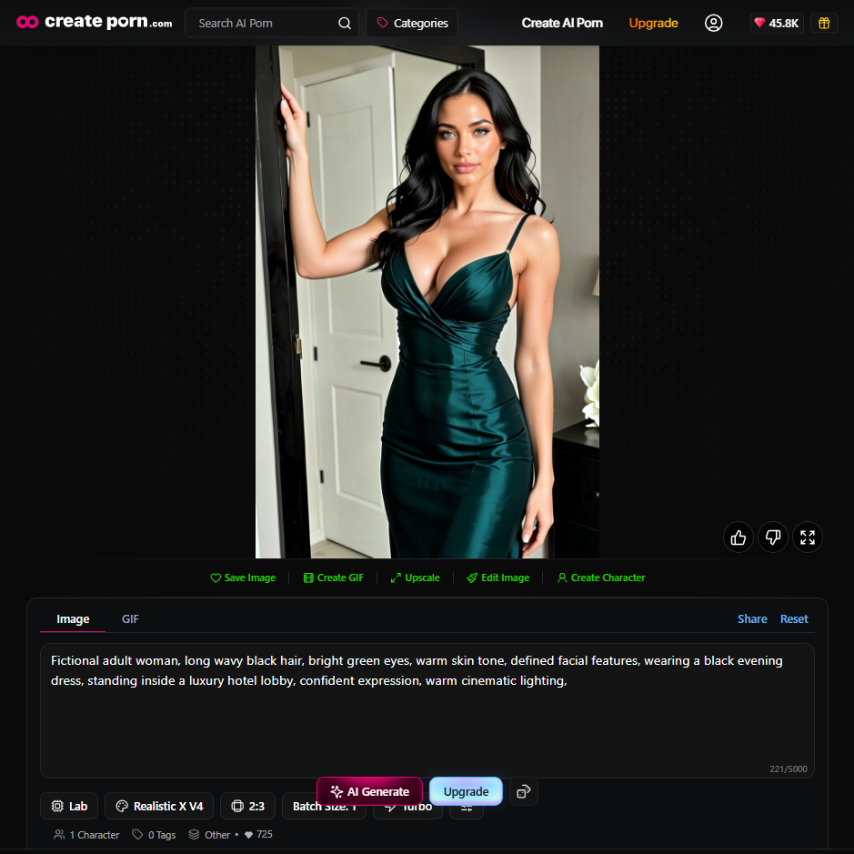
Scene One
“Fictional adult woman, long wavy black hair, bright green eyes, warm skin tone, defined facial features, wearing a black evening dress, standing inside a luxury hotel lobby, confident expression, warm cinematic lighting, ”
Scene Two
“Fictional adult woman, long wavy black hair, bright green eyes, warm skin tone, defined facial features, wearing casual summer clothing, walking along a beach at sunset, relaxed expression, golden-hour lighting, ”
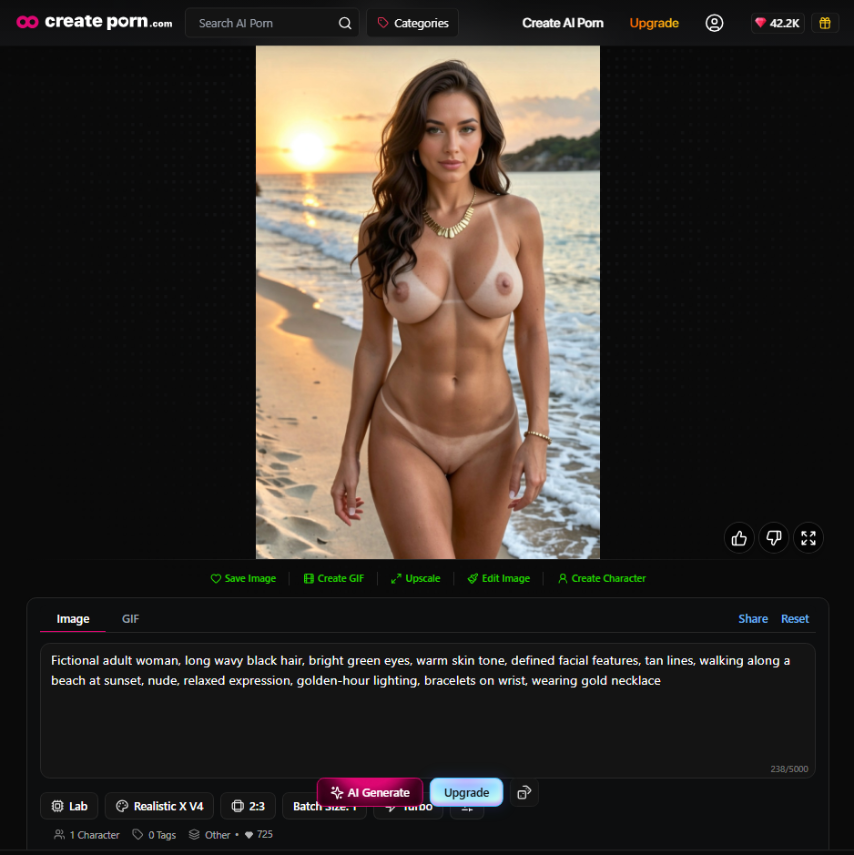
The environment and clothing change, but the defining character traits remain the same.
Createporn's Consistent Characters workflow can provide additional control when developing recurring characters across multiple creations.
→ AI Character Generator LP
Build a Reusable Character Prompt Library
If you create AI characters regularly, building a personal prompt library can make the process faster.
Create templates for different parts of your prompts.
For example:
Appearance Template
“Long [color] hair, [color] eyes, [skin description], [facial characteristics].”
Clothing Template
“Wearing [clothing type], [material or color details], [accessories].”
Pose Template
“[Standing/sitting/walking], [body position], [hand position], [camera direction].”
Expression Template
“[Confident/playful/serious/relaxed] expression, looking [toward camera/away from camera/to the side].”
Environment Template
“Inside [location], [background details], [time of day], [atmosphere].”
You can combine these templates to quickly create new character prompts.
How to Improve an AI Character Prompt
If your first generation does not look right, avoid changing everything at once.
Instead, identify the part that needs improvement.
If the face is wrong, refine the facial description.
If the environment is distracting, simplify the background.
If the pose is unclear, make the action more specific.
If the style is inconsistent, keep the same style description between generations.
AI generation is usually an iterative process.
Small prompt changes can produce noticeably different results.
Test Prompts Before Spending More Gems
If a prompt is not working, test the main concept before continuing to generate.
Start with a simple version of the prompt and generate one image. If the main idea works, gradually add details such as appearance, clothing, pose, environment, and lighting.
If the Generator repeatedly ignores the main concept, try clearer wording or another Style instead of repeatedly using the same prompt.
→ Prompt Testing Guide: How to Avoid Wasting Gems on Unsupported Prompts
Common AI Character Prompt Mistakes
Using Descriptions That Are Too Vague
Prompts such as:
“Attractive fantasy character.”
give the AI very little direction.
Add recognizable visual characteristics instead.
Adding Too Many Conflicting Details
Avoid combining instructions that work against each other.
For example, asking for multiple completely different art styles in the same prompt may produce unpredictable results.
Choose one clear visual direction first.
Changing Important Character Traits
If you want consistency, avoid changing defining details such as:
- Hair color
- Eye color
- Facial structure
- Major visual features
Keep those details stable and change the scene around them.
Ignoring the Environment
Character prompts are not only about the character.
Background, lighting, composition, and atmosphere can strongly influence the final image.
Experiment With Different Character Styles
The same basic character can look completely different when generated using another visual style.
For example, take this character:
“Fictional adult woman, long silver hair, blue eyes, black dress.”
You could generate the concept as:
- Anime
- Fantasy
- Cyberpunk
- Comic art
- 2.5D
- Cinematic artwork
Experimenting with different styles can help you find the visual direction that best suits your character.
→ AI Image Generator LP
Frequently Asked Questions
What makes a good AI character prompt?
A good AI character prompt clearly describes the important parts of the character, including appearance, clothing, pose, expression, environment, lighting, and visual style.
How detailed should an AI character prompt be?
Include enough information to communicate the intended character without filling the prompt with unnecessary or conflicting details. Focus on recognizable traits and the most important parts of the scene.
How do I make AI characters look consistent?
Keep the character's defining traits consistent between generations. Reuse important details such as hair, eyes, facial features, and other recognizable characteristics while changing scene-specific information separately.
Can I use the same AI character prompt multiple times?
Yes. Reusing a base character prompt is useful when developing the same fictional character across different scenes, clothing, environments, or poses.
Do tags help with AI character prompts?
Yes. Prompts can describe the overall concept while tags provide structured controls for elements such as actions, lighting, environments, camera angles, and visual characteristics.
Can AI character prompts create different art styles?
Yes. Adding a specific art direction to your prompt can change how the same character concept is interpreted.
Start Creating Your Own AI Characters
Strong AI character prompts give the model clear creative direction.
Start with the character's defining appearance, then add clothing, pose, expression, environment, lighting, and style.
You can also build reusable prompt templates so you do not have to start from scratch with every creation.
Once you find a character design you like, keep its core traits consistent and experiment with new scenes, outfits, poses, and visual styles.
With Createporn's character creation, image generation, prompt controls, tags, and Consistent Characters tools, you can turn a simple character idea into a reusable fictional character across multiple creations.
Start Creating With the AI Character Generator